Showing posts with label DataBase. Show all posts

Friday, 6 August 2010

Script Data in MS SQL Server 2008 Database Tables using Generate SQL Server Script Wizard

Open the Generate Scripts SubMenu Item from Task Menu

First of all, open the Microsoft SQL Server Management Studio which is installed from the Client Tools of a MS SQL Server 2008 installation package.

Connect to a MS SQL Server 2008 database instance using the Server Explorer or using the Connect screen.

Then open the Object Explorer window and expand the Databases node.

Here I connected to the local SQL Server 2008 instance and clicked over the Databases node and a list of existing sql server databases are visible in the object explorer window now. Later, I clicked the sql database MyWorks which owns the tables that I want to script data, rows/records of the database.

Continue by right clicking on the database name and open the context menu, chooes Tasks menu and open submenu. Select Generate Script submenu item from the displated list.


Generate SQL Server Script Wizards

When you select the Generate Scripts sub menu item the Generate SQL Server Scripts Wizard starts. SQL administrators and sql programmers can use the Script Wizard to generate t-sql scripts as a t-sql scripter to create scripts for any object (tables, views, schemas, etc). You can work in detail on the Script Wizard and find useful hint that you can benefit in your sql developments.


Select Database to Script

The first step in the Script Wizard is detemining the database to work on. You can choose a sql database among the listed all sql databases existing on the sql server instance.


Choose Script Options

Here is the screen where sql developers can configure the script details, and where developers can shape the automatic generated script according to the applications needs and requirements.

For our case, since we want to script table data which exists in the database that I have selected in the previous steps, we should set the Script Data option to True. You can see that the Script Data option is listed in the Table/View Options sections on the Choose Script Options screen. Since default Script Data option is set to false by default, we should alter this option in order to get an Insert statement for each row in the database table.

Note : Set Script Data option to True


Choose Object Types

This option in the Script Wizard is for the types of the objects we want the script generator to build scripts for. Since we deal with database tables, we will select Tables among the listed options such as Schema and User-defined table types.


Choose Tables

Since we selected Tables in the previous step, the wizard now displays all the tables that exists in the selected sql database. Here as a developer, I make a list of tables that I want to generate table data scripts for. For our sample case, I only select one table.


Output Option

Output Option screen in the Generate Script Wizard is the screen where a sql administrator or a programmer can make a selection among the existing output options. The script generator can create the desired scripts in the forms of a file, also can split the automatic generated script per object basis, or define the file as a unicode file or in ANSI text. A database developer can also select the file name and the output file folder for the script engine to create and place the script file.

Other output options are script to clipboard, just like a Copy-Paste operation and the last option is displaying the generated script on a new query window in the Microsoft SQL Server Management Studio.

I selected the New Query Window option in order to display the generated script by the MS SQL Server 2008.


Script Wizard Summary

Here is the last stop before proceeding to the script generation where database programmers can see which options they have selected and can go back to previous screen and make re-selections in the options for a desired script.


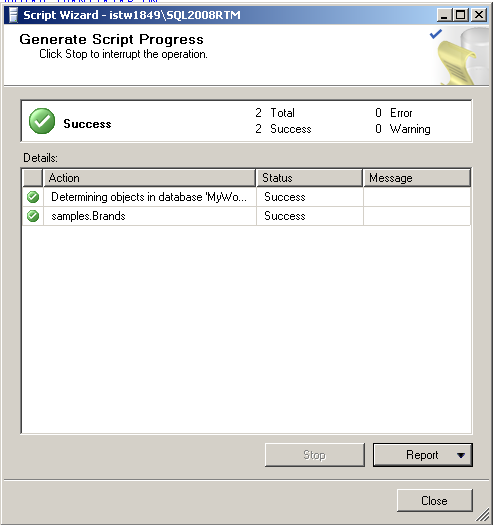
Generate Script Progress

Generate Script Progress screen displays the status of the scripting operation. If an error occurs sql developers and administrators can find the error details on this screen. If everything runs without any error and does not fail, you will see Success status for each scripting action on the progress screen


Data Script on the Query Window

Since as the output option for the scripting, the New Query Window is selected, the final script is displayed on the SQL Server Management Studio Query Editor window as shown below.

This script is formed of a CREATE TABLE script for the source table and following that, INSERT statements for each row in the selected source table.

As you see, any sql developer or any database administrator can use the below script to create a copy of any sql database tables with their data on another sql database or an other sql server instance


So as a summary, I want to say that if you frequently need to move tables from one sql database to an other with its data like me, you can use the Script Data option of the Generate SQL Server Scripts wizard. The Script Data option is a new enhancement in SQL Server Management Studio with the latest version, Microsoft SQL Server 2008. So you should have installed the Client Tools for MS SQL Server 2008 before using this option. SQL programmers can export data as sql script by using one of the existing SQL Server tools, SQL Server Generate Script Wizard.

Debugging Stored Procedures in SQL Server 2005

Pre-requisites


1. Find the .exe file under the directory, C:\Program Files\Microsoft SQL Server\90\Shared\1033\rdbgsetup.exe or similar path where the SQL Server was installed. The file rdbgsetup.exe stands for 'RemoteDeBuGsetup'. Look for the emphasis on letters. The filename reads rdbgsetup because, we are going to debug a stored procedures of a database available in some remote physical server. Either we need to sit at the server and debug them or we should be in a position to debug the stored procedure remotely. This action should be performed on the physical server where SQL Server 2005 was installed.

2. The user who debugs the stored procedure should be a member of SQL Server's fixed Server role, SysAdmin.

As a DBA, I may need to grant this privilege to the user who is in need of debugging a stored procedure. When I do that, I should trust the user so that he/she will not mess-up anything on the Server. Ok, I believe my users are trust worthy and I issue the following T-SQL command to assigning a fixer server role, SysAdmin.

The command to do so is as follows


EXEC master..sp_addsrvrolemember @loginame = N'<YourLoginName either SQL Server Authentication or Windows Authentication>', @rolename = N'sysadmin'

This can however be accomplished with SQL Server Management Studio's IDE. Perhaps, I prefer using T-SQL commands.

Note: The parameters to the stored procedure, sp_addsrvrolemember are of type, Nvarchar and it stands for (National Variable Character), which usually holds Unicode characters.

Now, we are all set for debugging stored procedures.

Process to Debug a stored procedure


1. Open the Microsoft Visual Studio 2005 IDE.

2. Select Server Explorer option from the View Menu as follows:


3. From the Data Connections node, right click and select, 'Add connection'. Fill in the details to connect to the intended SQL Server and the database using the login who has a fixed server role, SysAdmin. Click on Test connection. Once the connection succeeds, the overall screen should look like the following.


4. Expand the data connection just added, and navigate to the Stored Procedures node.

5. Expand the Stored Procedures node and select the intended SP to be debugged.

6. Right click and select open to view the source code of the selected stored procedure.

7. Place a break point on the intended line of code where debugging needs to be started its usually the way .NET Developers perform.

8. After performing the above steps the screen shot should look like the following.

9. After performing the above steps the screen shot should like the following:


10. Right click on the stored procedure from the 'Server Explorer' and select 'Step-Into Stored Procedure' as shown below.


11. This action brings up the following screen shot.


12. Enter the needful values and click Ok. The next shot will be the following.


13. From here on, its usual .NET debugging stuff. Use Step-Into and Step-Over and Step-out from the shortcuts menu or pressing F11,F10, Shift+F11

Wasn't that very simple. It made the life of DB developers much more comfortable. Had it not been available with SQL Server 2005 and VS 2005 IDE it would have been a nightmare to debug stored procedures remotely/locally.

Happy Development and concentrated debugging.

Saturday, 3 July 2010

Database Terms

* Aggregation - Objects that are composed of other objects.
* Concurrency - Databases must ensure that data is checked when concurrent access is allowed. Concurrent access means more than one application or thread may be reading or updating the same data at the same time.
* Database Garbage Collection - Garbage collection is the process of destroying objects that are no longer referenced, and freeing the resources those objects used. In Java there is a background process that performs garbage collection. Requires bi-directional object relationships. Determines if the database performs garbage collection on objects that are no longer referenced by the database. This keeps external programs from having to track the use of object pointers.
* DBMS - Database management system.
* Distributed Architecture - Object are sharing in a distributed environment or the entire database may be replicated on multiple computers.
* DML - Data Manipulation Language separate from programming languages (for RDBMS) and used as a means of getting and storing data in the database.
* Encapsulation - Data with method storage. Not all databases support the methods but rely upon the classes defined in the schema to reconstruct the object with its methods.
* Fault tolerance - Features that provide for fault tolerence in the event of a hardware of software failure. Normally transaction processing provides software fault tolerance. Data replication to other servers on the network supports hardware fault tolerance.
* Heterogeneous environment - Cross Platform support - The database may be able to run on various builds of computers and with various operating systems.
* Inheritance - Objects inherit attributes from parent objects.
* JDBC - An application program interface (API). Calls are used to execute SQL operations.
* normalized - Elimination of redundancy in databases so that all columns depend on a primary key.
* Notification - Notification may be active or passive. A passive system can minimally determine if an object has changed state. An active system may provide for an application to be informed when an object is modified.
* Object relationships - Object relationships define association with other objects, and whether objects can detect each other in one direction or two directions. Two way object relationships may allow for garbage collection.
* ODBMS - Object Database management system.
* OQL - Object Query Language, is a data manipulation language for Object Databases although many object databases do not support it. They rely on object class extensions or interfaces for their support.
* Persistence - Databases provide persistance which for object databases means object can be stored between database runs.
* RDBMS - Relational database management system.
* Schema - The data structure of the database.
* SQL - Structured Query Language is a standard language for communication with a relational database management system (RDBMS). Structured Query Language, is a data manipulation language which is a standard for getting and storing data in an RDBMS.
* SQLJ - Supports structured query language (SQL) calls for Java. It consists of a language allowing SQL statements to be embedded in it, a translator, and a runtime model.
* Transaction processing - Some databases may have some form of transaction processing which may support concurrency. Transaction processing will ensure that the entire transaction is made or none of it is made. Transactions support concurrency and data recovery. A data failure will cause a rollback of data.

Object Oriented Databases

Object oriented databases are also called Object Database Management Systems (ODBMS). Object databases store objects rather than data such as integers, strings or real numbers. Objects are used in object oriented languages such as Smalltalk, C++, Java, and others. Objects basically consist of the following:

* Attributes - Attributes are data which defines the characteristics of an object. This data may be simple such as integers, strings, and real numbers or it may be a reference to a complex object.
* Methods - Methods define the behavior of an object and are what was formally called procedures or functions.

Therefore objects contain both executable code and data. There are other characteristics of objects such as whether methods or data can be accessed from outside the object. We don't consider this here, to keep the definition simple and to apply it to what an object database is. One other term worth mentioning is classes. Classes are used in object oriented programming to define the data and methods the object will contain. The class is like a template to the object. The class does not itself contain data or methods but defines the data and methods contained in the object. The class is used to create (instantiate) the object. Classes may be used in object databases to recreate parts of the object that may not actually be stored in the database. Methods may not be stored in the database and may be recreated by using a class.
Comparison to Relational Databases

Relational databases store data in tables that are two dimensional. The tables have rows and columns. Relational database tables are "normalized" so data is not repeated more often than necessary. All table columns depend on a primary key (a unique value in the column) to identify the column. Once the specific column is identified, data from one or more rows associated with that column may be obtained or changed.

To put objects into relational databases, they must be described in terms of simple string, integer, or real number data. For instance in the case of an airplane. The wing may be placed in one table with rows and columns describing its dimensions and characteristics. The fusalage may be in another table, the propeller in another table, tires, and so on.

Breaking complex information out into simple data takes time and is labor intensive. Code must be written to accomplish this task.
Object Persistence

With traditional databases, data manipulated by the application is transient and data in the database is persisted (Stored on a permanent storage device). In object databases, the application can manipulate both transient and persisted data.
When to Use Object Databases

Object databases should be used when there is complex data and/or complex data relationships. This includes a many to many object relationship. Object databases should not be used when there would be few join tables and there are large volumes of simple transactional data.

Object databases work well with:


* CAS Applications (CASE-computer aided software engineering, CAD-computer aided design, CAM-computer aided manufacture)
* Multimedia Applications
* Object projects that change over time.
* Commerce

Object Database Advantages over RDBMS

* Objects don't require assembly and disassembly saving coding time and execution time to assemble or disassemble objects.
* Reduced paging
* Easier navigation
* Better concurrency control - A hierarchy of objects may be locked.
* Data model is based on the real world.
* Works well for distributed architectures.
* Less code required when applications are object oriented.

Object Database Disadvantages compared to RDBMS

* Lower efficiency when data is simple and relationships are simple.
* Relational tables are simpler.
* Late binding may slow access speed.
* More user tools exist for RDBMS.
* Standards for RDBMS are more stable.
* Support for RDBMS is more certain and change is less likely to be required.

ODBMS Standards

* Object Data Management Group
* Object Database Standard ODM6.2.0
* Object Query Language
* OQL support of SQL92

How Data is Stored

Two basic methods are used to store objects by different database vendors.

* Each object has a unique ID and is defined as a subclass of a base class, using inheritance to determine attributes.
* Virtual memory mapping is used for object storage and management.

Data transfers are either done on a per object basis or on a per page (normally 4K) basis.